Your AI teammate inside ERPNext New

Meet Jarvis, your AI teammate inside ERPNext.

Ask in plain language, see the records behind every answer, prepare the next step, and turn good work into a routine your team can use again.

The business keeps moving. You stay in control.

The Jarvis app lives in ERPNext. Its agent loop runs in an isolated hosted container and respects the signed-in user's permissions.

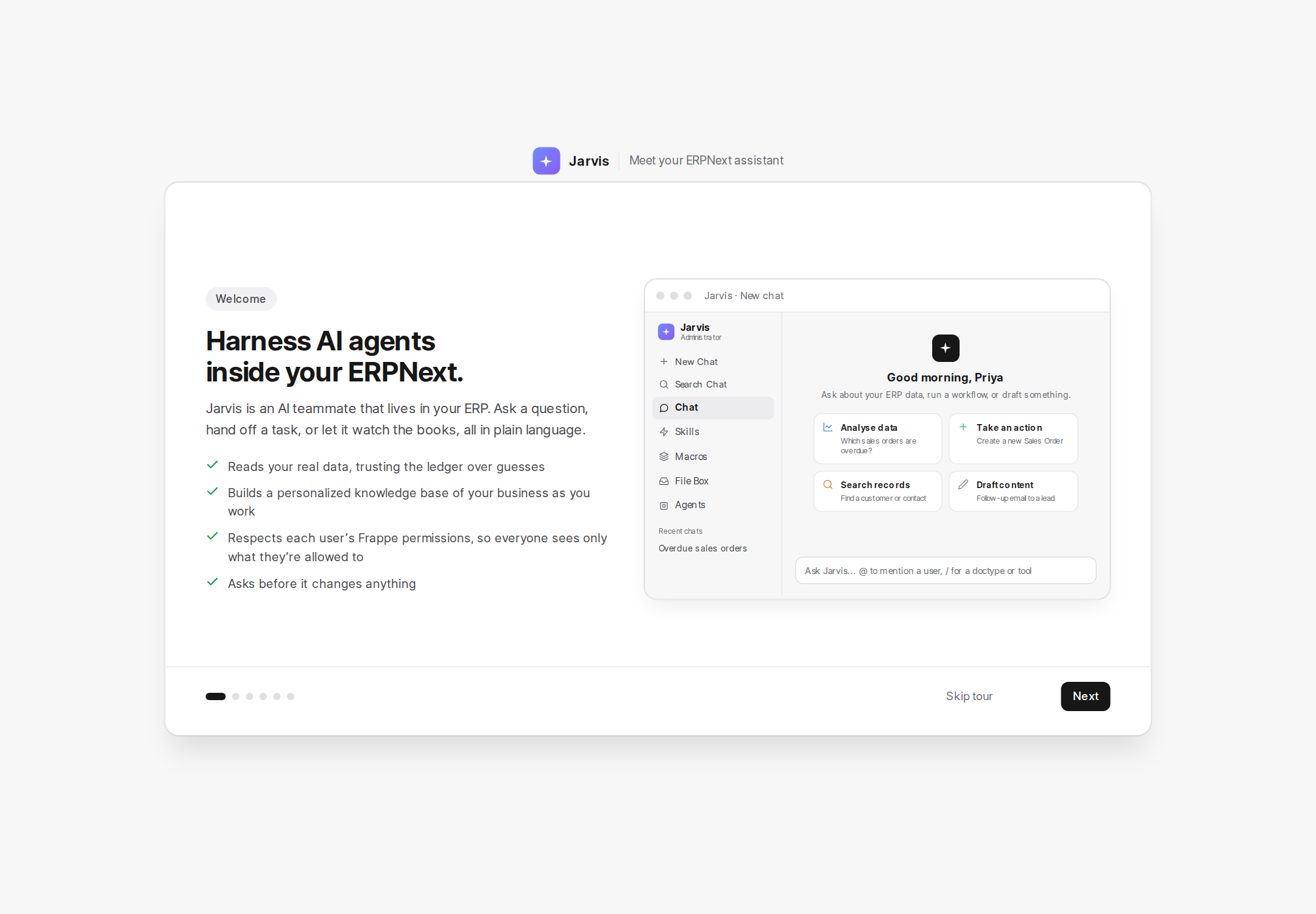
Jarvis onboarding screen introducing an AI teammate that reads your data, builds a knowledge base, respects Frappe permissions, and asks before important changes.

What Jarvis is

An AI teammate, working on top of the records you already keep.

Ask a question, hand off a task, or let it watch the books in plain language. Connect supported chat subscriptions, AI provider APIs, or locally hosted models while your ERPNext permissions remain the boundary.

Reads your real data

It trusts the ledger over guesses, answering from the records your business actually holds.

Learns your business

It builds a personalized knowledge base of how your business works as you work.

Respects permissions

It follows each user's Frappe permissions, so everyone sees only what they're allowed to.

Asks before it acts

It asks before important changes, so a person stays in the loop on the work that matters.

How it helps

Three ways Jarvis carries the work.

01

Understand what is happening

Ask a plain question and see the records behind the answer.

02

Keep good work moving

Prepare the next step and turn a trusted routine into work your team can repeat.

03

Give attention where it matters

Let Jarvis watch the routine and bring people the exceptions and decisions.

Inside Jarvis

Everything you need, where the work already is.

A connected set of tools for asking, preparing, automating, and deciding - all inside your ERPNext.

Chat

Tell Jarvis what you need in plain words. @-mention people, / to pick a record type, tool, or Skill, attach files and images, use voice, and choose the AI model.

Agents

Installable specialists for one area - Bank & Reconciliation, Close & Reporting - that run on a schedule and produce Runs and Findings. An installed Agent is not an invisible employee.

Skills

Save a business rule, tone, or checklist once and invoke it with /name. Share it or promote it to role or company scope with review.

Triggers

Watch for a record event and start a saved instruction - event-driven automation you create in plain language.

Macros

Turn several chat steps into one named routine. Run it manually or on a schedule, with a full run history.

Approval Board

The inbox for work Jarvis prepared that a person must decide - drafts, questions, agent-prepared work. Approve, reject, or answer. Only the owner of an approval or a Jarvis administrator can approve it.

Dashboards

Turn a conversation about your numbers into a saved, shareable view and export PNG or PDF. Sharing never grants access to source data a viewer couldn't already read.

File Box

Drop in supplier bills, bank statements, and price lists. Jarvis processes them into draft work - a bill becomes a draft purchase invoice - that still routes through approval.

Wiki & Business Notes

A business memory grown from notes and reviewed learning - scoped to company, role, or user, with trust signals like Latest source, Conflicting, and Stale. The Wiki helps Jarvis remember; it does not replace the official amount, stock level, or status in your records.

Command palette

Cmd/Ctrl+K to jump to conversations, dashboards, Frappe records, lists, and reports - only what you're allowed to open.

AI models

Admins connect chat-subscription or API-key providers and set a fallback order; "Auto" picks per workspace. A fallback protects availability, not identical answers.

Voice, mobile & more

Voice and files, notifications, learning & review, a mobile app (QR pairing - pairing a phone does not widen your access), lists & filters, and conversations built around one outcome each.
Trust & approvals

A clear line between reading and changing.

Jarvis can read and explain directly. Important and hard-to-reverse actions always require a person. An administrator may allow some ordinary, reversible changes within a chat.

Changes come to you as a confirmation card

A change surfaces as a confirmation card in chat or on the Approval Board before it happens.

Approval is scoped, not a blank cheque

Approval is permission for the one action shown - nothing more.

Background work obeys the same boundary

Agent and scheduled work follows the same rules as anything you ask for directly.

Never a shortcut around your permissions

Jarvis follows each person's existing Frappe permissions and is never a way around them.

In practice

What teams do with Jarvis.

Chat

Know today's cash before agreeing to a purchase.

File Box

Turn a supplier bill into a clean draft.

Agents

Prepare bank matches and review every proposal.

Macros

Run month-end close the same way every time.

Approval Board

Clear the morning document queue safely.

Skills

Send consistent overdue payment follow-ups.

Triggers

Flag a large invoice the moment it's submitted.

Dashboards

Build a weekly owner dashboard.

See it work

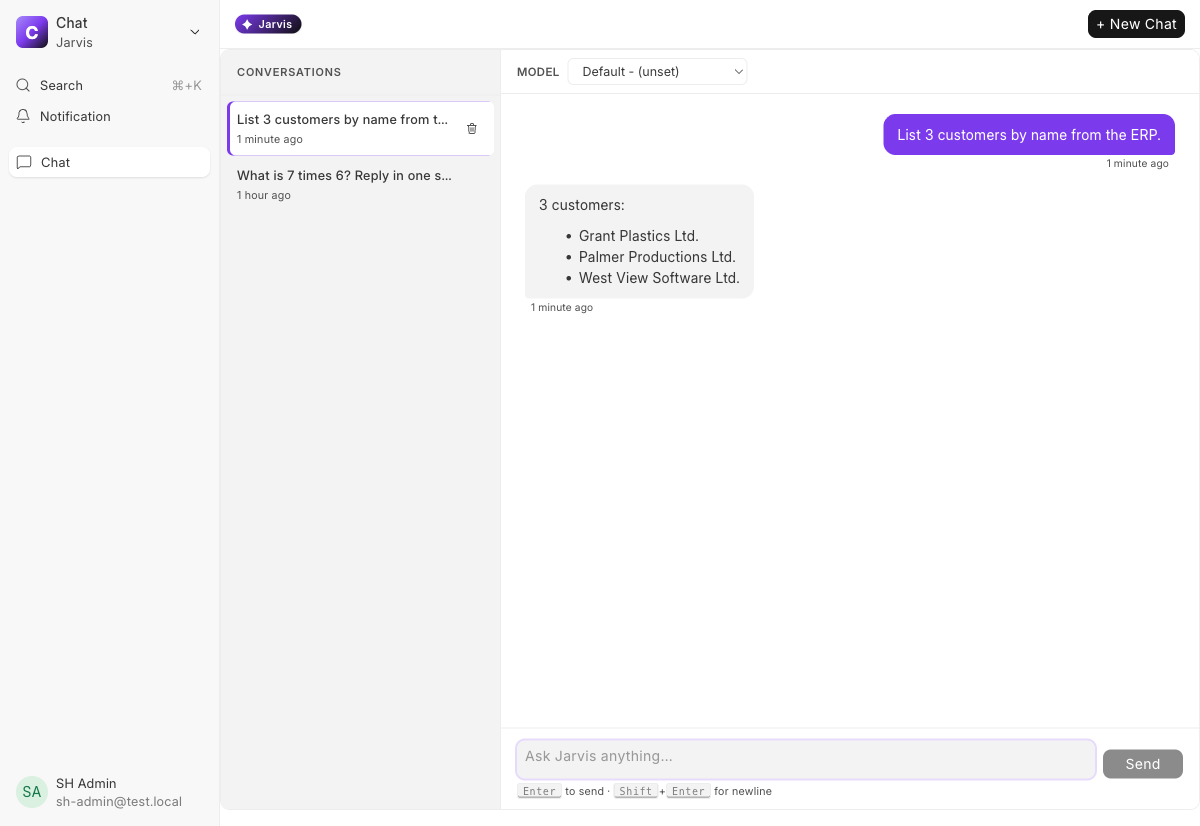
Ask in plain language, and get answers from your real data.

Jarvis answers from the records your business already keeps, so the reply reflects your live data - not a guess - and you can act on it.

Jarvis chat answering an ERP query, listing three customers drawn directly from the ERPNext records.

Bring an AI teammate into your ERPNext.

Start with one real task. Ask, verify, approve, and save the work your team should be able to repeat.

More from Aerele

The rest of the toolbox

More tools built from our work in the Frappe ecosystem. Some are live, others are on the way.